Changing your Password
Official tutorials provided by Cambridge Numerical Solutions
Overview
This tutorial provides a step by step guide to changing the password for Cambridge Numerical Solutions (CNS) account.
Note: If you have forgotten your password and would like to reset it, please instead follow the instructions at forgot password.
Changing your password
To change your password, go to the ‘My Account’ page:
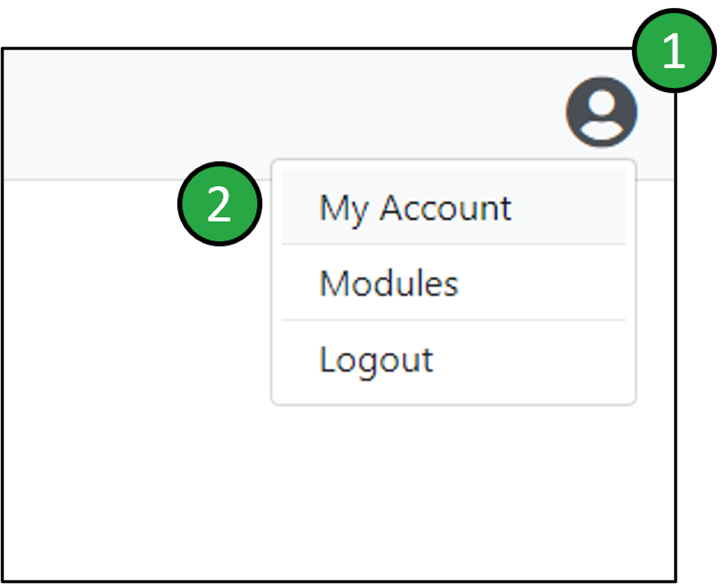
Accessing the ‘My Account’ page using the User button.
- Click on the User button which can always be found in the top-right corner of the application window.
- Click on the ‘My Account’ option in the dropdown menu. This will direct you to your account management page.
You can change your password within the ‘Account Details’ section of your account management page:
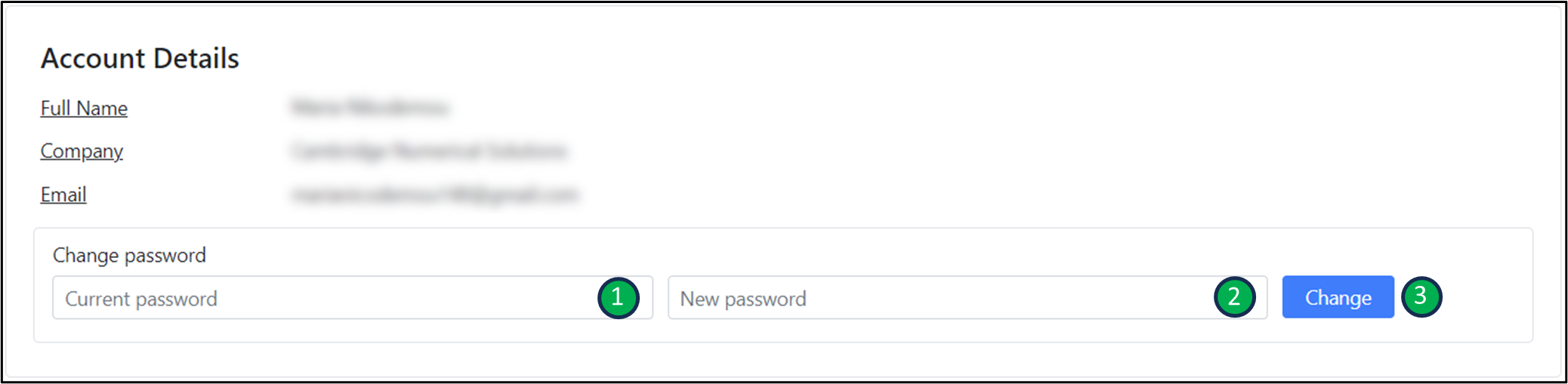 Changing your password on the account management page.
- Enter your current password in the ‘Current password’ section.
- Enter the new password that you would like to use in the ‘New password’ section.
- Click on the ‘Change’ button to change your password.
On this page

We’d be happy to help. Get in touch today.

Official Greek distributor for Cambridge Numerical Solutions
COMPANY
Corporate Name:
Cambridge Advanced Simulations S.A.
Legal Form: Single Member S.A.
REGISTRATION
GEMI No: 188724401000
Athens